
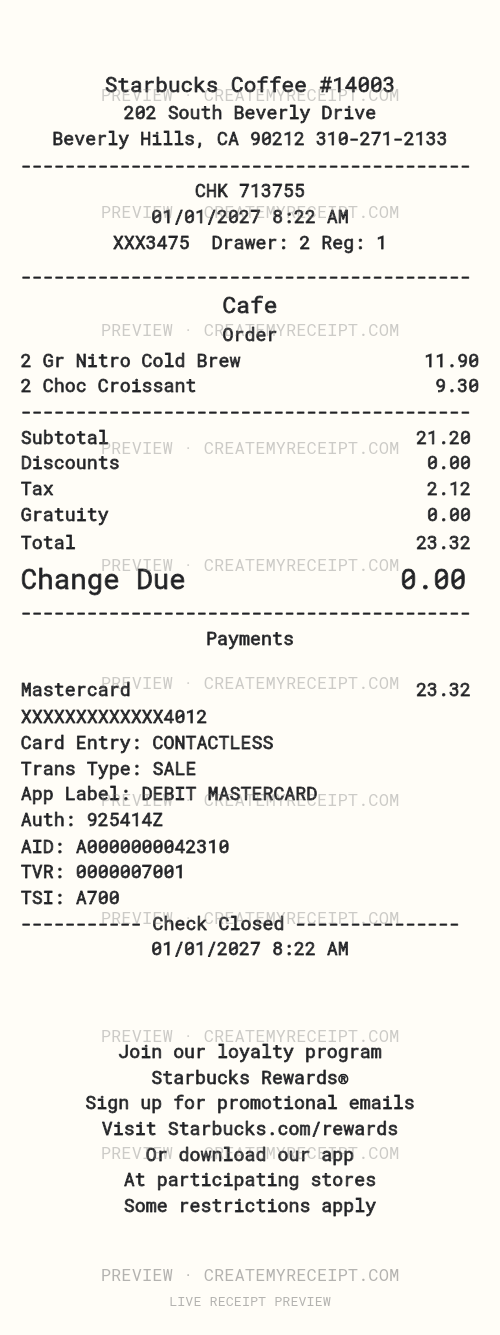
What this example shows
Beverly Hills · 202 South Beverly Drive · Example data, not current product prices.
| Item | Quantity | Unit price | Amount |
|---|---|---|---|
| Gr Nitro Cold Brew | 2 | $5.95 | $11.90 |
| Choc Croissant | 2 | $4.65 | $9.30 |
| Subtotal | $21.20 | ||
| Tax | $2.12 | ||
| Total | $23.32 |
Ask for the receipt before the coffee run is over
A quick coffee purchase is easy to overlook in your budget. Ask for the original receipt at checkout, including when you pay digitally. Save the itemized document so you can distinguish drinks, pastries, discounts, tax and the amount paid. A payment notification may confirm a charge without showing each item.
Recover an original Starbucks purchase record first
Check the order details available through the channel you used, including any confirmation email. If you cannot find the document, ask the store or contact official Starbucks customer service about available recovery options for that transaction. Do not assume every purchase has the same receipt history or can be reprinted.
Keep coffee spending clear
This editable example includes two Gr Nitro Cold Brew drinks and two Choc Croissants, with a recorded subtotal of $21.20, tax of $2.12 and total of $23.32. These are sample values, not current Starbucks prices or a tax-rate claim. Replace them with confirmed purchase details and keep the source document.
Group coffee purchases by month or purpose in your own records. Keep a reload or transfer separate from a food-and-drink purchase so you do not count the same spending twice. Record any confirmed refund separately.
Edit the header, items and receipt layout
The saved foundation uses a Starbucks Coffee business-name header. Move fields, edit wording and spacing, add an image or QR code, and choose separate left labels and right amounts for subtotal, tax and total. Use images you have the right to use. Visual edits do not create a transaction in Starbucks systems.
Export confirmed coffee purchases to CSV or Excel/XLSX
Use CMR CSV export to sort recorded coffee purchases and compare monthly spending in a spreadsheet. Excel/XLSX export is also available through applicable paid export options. Review structured quantities and amounts before exporting: custom printed text does not automatically update numeric receipt data. Preserve original receipts alongside your export.
Quick questions
What if I lost or damaged my receipt?
Try official recovery first. If the original cannot be recovered, CMR can help recreate a personal record for internal organization using only confirmed details. Leave unknown items or amounts unknown.
Is this a Starbucks-issued receipt?
No. This is an editable user-created template, not a Starbucks-issued original or a guarantee of reimbursement.
Can I customize the business header or add a logo?
Yes. Edit the header and upload an image you have the right to use. This published foundation currently uses a text header rather than an uploaded logo image.
Official customer-service link checked October 10, 2026.
CreateMyReceipt is independent and is not affiliated with Starbucks.