
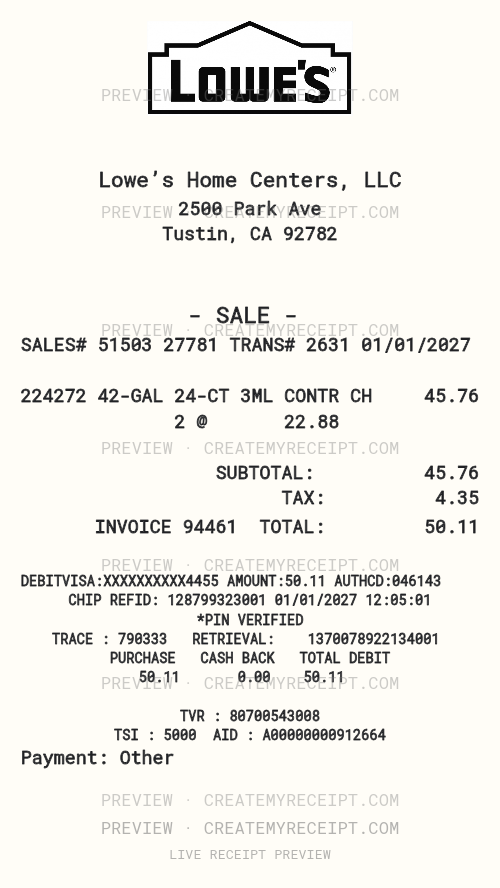
What this example shows
Tustin · 2500 Park Ave · Example data, not current product prices.
| Item | Quantity | Unit price | Amount |
|---|---|---|---|
| 42-GAL 24-CT 3ML CONTR CH | 2 | $22.88 | $45.76 |
| Subtotal | $45.76 | ||
| Tax | $4.35 | ||
| Total | $50.11 |
Keep the purchase connected to the project
A materials purchase can include cleanup supplies, tools and products intended for different jobs. Keep the product code, quantity and unit price together. A project note helps explain where supplies were used without changing the original store receipt.
This example includes two units of a contractor-bag item. Record the purchased unit separately from the quantity of contents described on the packaging: two packs and the number of bags inside those packs are different quantities. Copy the source description rather than guessing a unit from an abbreviation.
Lowe’s receipt recovery and returns
Try to recover the original document first. Lowe’s official policy requires valid proof of purchase for returns or exchanges. It lists several ways it can attempt purchase validation: a physical or electronic receipt, order number, payment card or digital wallet, phone number, or rewards account. Successful validation does not automatically establish return eligibility; product-specific exceptions still matter.
Use Lowe’s official return policy and purchase-validation guidance or its customer help page. Sources checked October 10, 2026.
Lowe’s receipt logo and editable header
The preview shows the Lowe’s logo above the Tustin example header. Customize the business wording, address, header size and placement, or replace images you have the right to use. Editing a logo or barcode does not create a transaction in Lowe’s systems.
Export receipt records to CSV or Excel/XLSX
CMR offers CSV and Excel/XLSX through its paid export options. Review the structured amounts before exporting and retain the source receipt. Use columns for date, project, product, purchased quantity and amount; keep purchases and refunds distinguishable.
Custom printed wording and spacing do not necessarily change the numeric data used in a spreadsheet. Compare the exported record with the confirmed purchase before relying on its totals.
Quick questions
What if my Lowe’s receipt is lost or damaged?
Check any order email or saved document and ask Lowe’s about recovering or validating the purchase. When the original cannot be recovered, CMR can help recreate a personal record for internal organization using confirmed details. Leave unknown items or amounts unknown.
Can I change wording and spacing?
Yes. Open an editable copy, select a field and adjust its text, alignment, size and position. Review the result before saving or exporting.
Does this create a Lowe’s-issued receipt?
No. It creates a user-controlled record, not a merchant-issued original or a guarantee of a return or reimbursement.
CreateMyReceipt is independent and is not affiliated with Lowe’s.