
Chevron receipt guide
Find and organize Chevron receipts
An independent guide to locating merchant records and organizing a personal record with confirmed details.
- Editable
- Vault-ready
- CSV/XLSX export
- Tax Lens
CMR foundation design
Chevron gas receipt template · 80 mm · v17
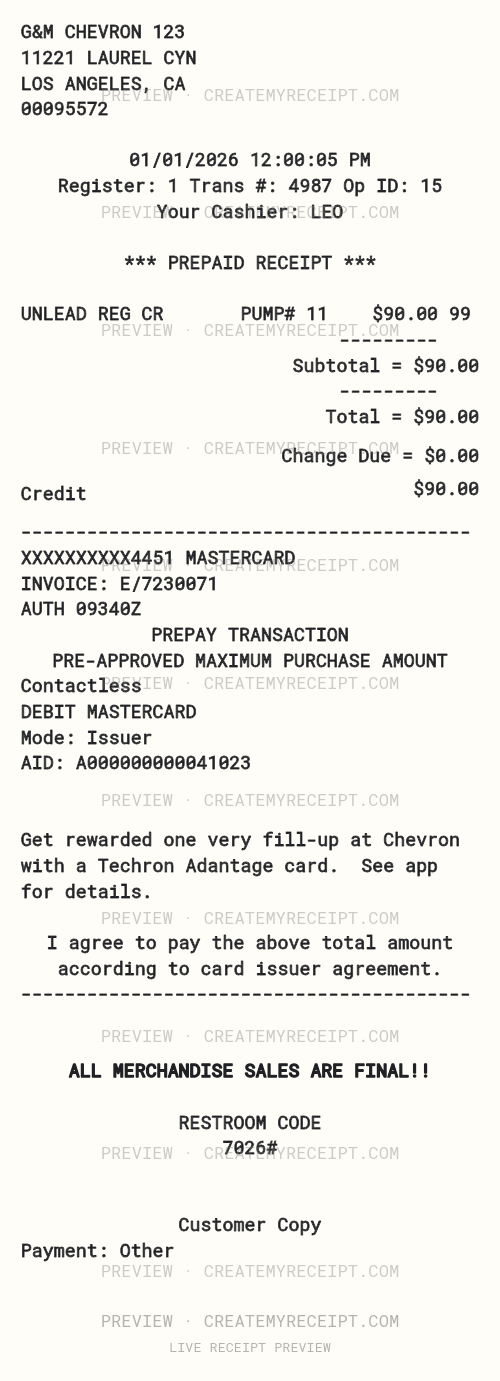
Sample G&M CHEVRON 123 receipt with Unleaded regular gasoline at pump 11 totaling $90.00.
Blank fields · no purchase data included.
Create an editable copy, then save it to your private CMR Vault.
Learn how to find Chevron receiptsExample G&M CHEVRON 123 receipt
Sample G&M CHEVRON 123 receipt with Unleaded regular gasoline at pump 11 totaling $90.00.
- Sample location
- G&M Chevron 123 — 11221 LAUREL CYN, Los Angeles, CA
- Pump number
- 11
Items on this sample receipt
| Item |
|---|
| Unleaded regular gasoline |
Sample receipt totals
| Total | $90.00 |
|---|
Sample / simulation: CMR sample / simulation — not a merchant-issued original.
What could this purchase cost over time?
This sample receipt totals: $90.00
Sample item spending
Sample item spending
Sample item spending
Sample item spending
Sample item spending
Sample item spending
Sample item spending
Sample item spending
Sample item spending
Convention: 52 weeks per year; month equals annual projection divided by 12.
Want to compare this simulation with what you actually spend? Track real receipts with CMR
Fields you can enter when confirmed
- Merchant
- Purchase date
- Line items
- Subtotal
- Discounts
- Tax
- Total
- Payment method
- Fees
- Personal note
These are optional CreateMyReceipt fields—not a claim about the merchant’s systems or documents.
Page-specific scope
Find and organize Chevron receipts is prepared for a specific recordkeeping intent. An owner-reviewed, receipt-specific recordkeeping layout for Chevron; source image and design remain private until individually reviewed. Before any approval, a person must confirm that examples, links, and sources actually satisfy this intent rather than repeating another category page.
Start with the record
This is an independent guide to organizing purchase records a user identifies as Chevron. It does not describe that merchant’s policies, prices, programs, locations, or merchant-issued documents. Keep the available receipt or payment record close by, and do not fill an unknown field with a guess. A user-created record can help organize information, but it does not become a merchant-issued original.
What to review
Check the name shown on the record, purchase date, currency, line items, subtotal, separately listed charges, and final total. If the transaction includes a discount, temporary authorization, refund, or tip, keep it separate when the source does.
A synthetic example
For practice, imagine a purchase with two line items, a visible discount, and a final total. The example helps confirm that each line belongs to the same purchase; it does not establish a merchant policy or a local rate. Record only amounts supported by the receipt or payment record.
Organize the record
Use a CMR Vault name that makes the purchase easy to find later, while keeping the merchant as it is known. Check the date before grouping records by month, category, or project. Keep a refund as a separate event so the original payment is not hidden.
Check the amounts
CMR Tax Lens can compare recorded subtotal and tax amounts. Its result is an observed ratio, not a claim about a legal rate. If the taxable base is unknown, leave the comparison incomplete and consult an appropriate source.
Next step
After the details are confirmed, you can create a receipt, review organization guides, or prepare an expense report. Review every field before saving or exporting.
Review checklist
- The record describes a real transaction.
- Unknown details remain unknown.
- Line items and total match the available source.
- Discounts, fees, refunds, and tips are not counted twice.
- The record does not claim affiliation, approval, or endorsement by another business.
Independence notice. CreateMyReceipt is an independent tool and is not affiliated with Chevron. No sponsorship, endorsement, or approval is implied. This guide does not replace a merchant-issued original.