
Costco receipt guide
Find and organize Costco purchase receipts
Costco has separate official receipt paths for warehouse purchases and Costco.com orders. Start with the channel: a warehouse entry may be linked to the membership on the account, while an online order has its own invoice route.
- Editable
- Vault-ready
- CSV/XLSX export
- Tax Lens
CMR foundation design
Costco receipt template · 80 mm · v1
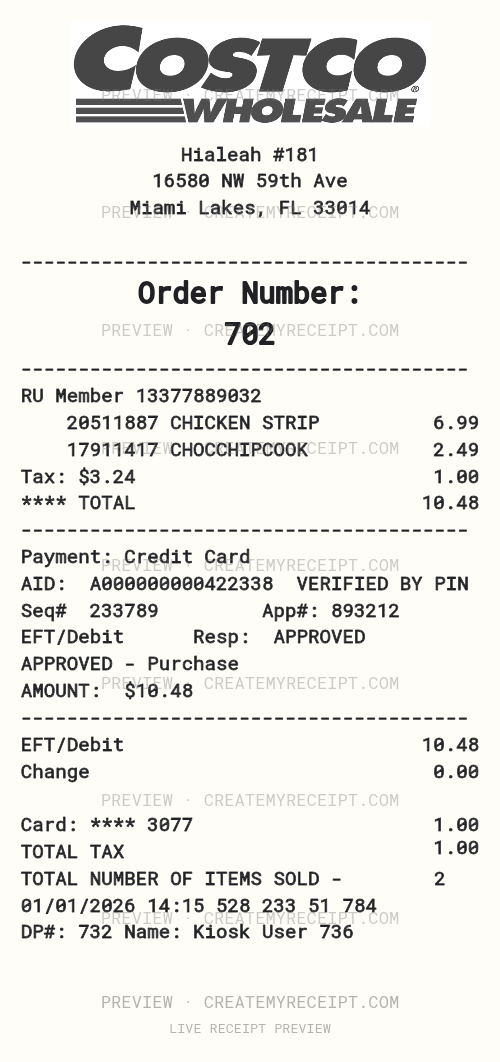
Sample Hialeah #181 receipt with CHICKEN STRIP and CHOCCHIPCOOK totaling $9.72.
Blank fields · no purchase data included.
Create an editable copy, then save it to your private CMR Vault.
Learn how to find Costco receiptsExample Hialeah #181 receipt
Sample Hialeah #181 receipt with CHICKEN STRIP and CHOCCHIPCOOK totaling $9.72.
- Sample location
- 16580 NW 59th Ave
- Purchase date
- 2026-01-28
- Purchase time
- 12:07
- Receipt/order reference
- COS-028
- Payment method
- credit card
Items on this sample receipt
| Item | Quantity | Unit price | Line total |
|---|---|---|---|
| CHICKEN STRIP | 1 | $6.99 | $6.99 |
| CHOCCHIPCOOK | 1 | $2.49 | $2.49 |
Sample receipt totals
| Subtotal | $9.48 |
|---|---|
| Discount | $3.00 |
| Tax | $3.24 |
| Tip | $0.00 |
| Service charge | $0.00 |
| Fees | $0.00 |
| Total | $9.72 |
Sample / simulation: CMR sample / simulation — not a merchant-issued original.
What could this purchase cost over time?
This sample receipt totals: $9.72
Largest item: CHICKEN STRIP · $6.99 (71.9%)
Sample item spending
| Item | Quantity | Per purchase | Per month | Per year |
|---|---|---|---|---|
| CHICKEN STRIP | 1 | $6.99 | $30.29 | $363.48 |
| CHOCCHIPCOOK | 1 | $2.49 | $10.79 | $129.48 |
Largest item: CHICKEN STRIP · $6.99 (71.9%)
Sample item spending
| Item | Quantity | Per purchase | Per month | Per year |
|---|---|---|---|---|
| CHICKEN STRIP | 1 | $6.99 | $60.58 | $726.96 |
| CHOCCHIPCOOK | 1 | $2.49 | $21.58 | $258.96 |
Largest item: CHICKEN STRIP · $6.99 (71.9%)
Sample item spending
| Item | Quantity | Per purchase | Per month | Per year |
|---|---|---|---|---|
| CHICKEN STRIP | 1 | $6.99 | $90.87 | $1,090.44 |
| CHOCCHIPCOOK | 1 | $2.49 | $32.37 | $388.44 |
Largest item: CHICKEN STRIP · $6.99 (71.9%)
Sample item spending
| Item | Quantity | Per purchase | Per month | Per year |
|---|---|---|---|---|
| CHICKEN STRIP | 1 | $6.99 | $121.16 | $1,453.92 |
| CHOCCHIPCOOK | 1 | $2.49 | $43.16 | $517.92 |
Largest item: CHICKEN STRIP · $6.99 (71.9%)
Sample item spending
| Item | Quantity | Per purchase | Per month | Per year |
|---|---|---|---|---|
| CHICKEN STRIP | 1 | $6.99 | $151.45 | $1,817.40 |
| CHOCCHIPCOOK | 1 | $2.49 | $53.95 | $647.40 |
Largest item: CHICKEN STRIP · $6.99 (71.9%)
Sample item spending
| Item | Quantity | Per purchase | Per month | Per year |
|---|---|---|---|---|
| CHICKEN STRIP | 1 | $6.99 | $212.03 | $2,544.36 |
| CHOCCHIPCOOK | 1 | $2.49 | $75.53 | $906.36 |
Largest item: CHICKEN STRIP · $6.99 (71.9%)
Sample item spending
| Item | Quantity | Per purchase | Per month | Per year |
|---|---|---|---|---|
| CHICKEN STRIP | 1 | $6.99 | $15.15 | $181.74 |
| CHOCCHIPCOOK | 1 | $2.49 | $5.40 | $64.74 |
Largest item: CHICKEN STRIP · $6.99 (71.9%)
Sample item spending
| Item | Quantity | Per purchase | Per month | Per year |
|---|---|---|---|---|
| CHICKEN STRIP | 1 | $6.99 | $6.99 | $83.88 |
| CHOCCHIPCOOK | 1 | $2.49 | $2.49 | $29.88 |
Largest item: CHICKEN STRIP · $6.99 (71.9%)
Sample item spending
| Item | Quantity | Per purchase | Per month | Per year |
|---|---|---|---|---|
| CHICKEN STRIP | 1 | $6.99 | $13.98 | $167.76 |
| CHOCCHIPCOOK | 1 | $2.49 | $4.98 | $59.76 |
Convention: 52 weeks per year; month equals annual projection divided by 12.
Want to compare this simulation with what you actually spend? Track real receipts with CMR
Fields you can enter when confirmed
- Merchant
- Purchase date
- Line items
- Subtotal
- Discounts
- Tax
- Total
- Payment method
- Fees
- Personal note
These are optional CreateMyReceipt fields—not a claim about the merchant’s systems or documents.
Merchant-specific starting point
Costco has separate official receipt paths for warehouse purchases and Costco.com orders. Start with the channel: a warehouse entry may be linked to the membership on the account, while an online order has its own invoice route.
Use the matching record path
For warehouse purchases, Costco directs members to Orders & Purchases and then In-Warehouse, with records shown in six-month intervals for up to two years. Costco also says a purchase can take up to 24 hours to appear. For Costco.com, use Orders & Returns, open the order, and use Print Invoice when that is the document you need.
Keep identifiers distinct
Record whether the evidence was “In-Warehouse” or “Costco.com invoice.” Costco lists exclusions for the warehouse display, including some services and purchase types, so absence from that view is not proof that a purchase did not occur. Keep a membership-linked fact separate from a payment-card fact.
Keep a clear personal record
In CMR, use a source note such as “Costco warehouse history” or “Costco.com invoice,” then store only the receipt fields you can confirm. Do not fill excluded or delayed records with estimates. This preserves a useful audit trail without representing CMR as Costco’s membership or invoice system.
Common question: Why is a warehouse purchase not visible yet?
Costco says an in-warehouse purchase can take up to 24 hours to appear. Wait for the official record instead of reconstructing a total from memory.
Common question: Can I treat warehouse history and a Costco.com invoice as the same source?
No. Label the channel and document type. The official retrieval paths and stated limits are different.
Create or recreate a Costco receipt record
Enter only details confirmed by your source, such as merchant, date, items, subtotal, tax, payment method, and total. Use the editable layout above when available, or create a receipt manually; review the record before saving or exporting.
Organize in CMR Vault
Save the merchant, date, currency, line items, subtotal when shown, and total. Keep refunds as separate events and use a note to identify the record source. CMR Vault helps you find a personal record by date, merchant, or category.
Export receipt data to CSV or XLSX
When you need to review several purchases, export one summary row per receipt or item detail to CSV/XLSX. Check that the currency, date, and document type still match the source before sharing a file.
Compare amounts carefully
CMR Tax Lens compares recorded subtotal and tax as an observed ratio, not a legal rate. Keep the taxable base unknown when the record does not make it clear.
Organize expenses and use related guides
You can prepare an expense report after confirming the fields and use organization guides to sort records by period, merchant, or project. Templates are starting points for your own data, not merchant documents.
Next step
When the details match the source, create a receipt for your personal record and review it before saving or exporting.
Official resources
- How do I view my receipts for in-warehouse purchases?
Check the original source for current steps.
- How can I get a receipt for a Costco.com order?
Check the original source for current steps.
Independence notice. Costco and related marks belong to their respective owners. CreateMyReceipt is an independent tool and is not affiliated with Costco.