
A clearer record for project materials
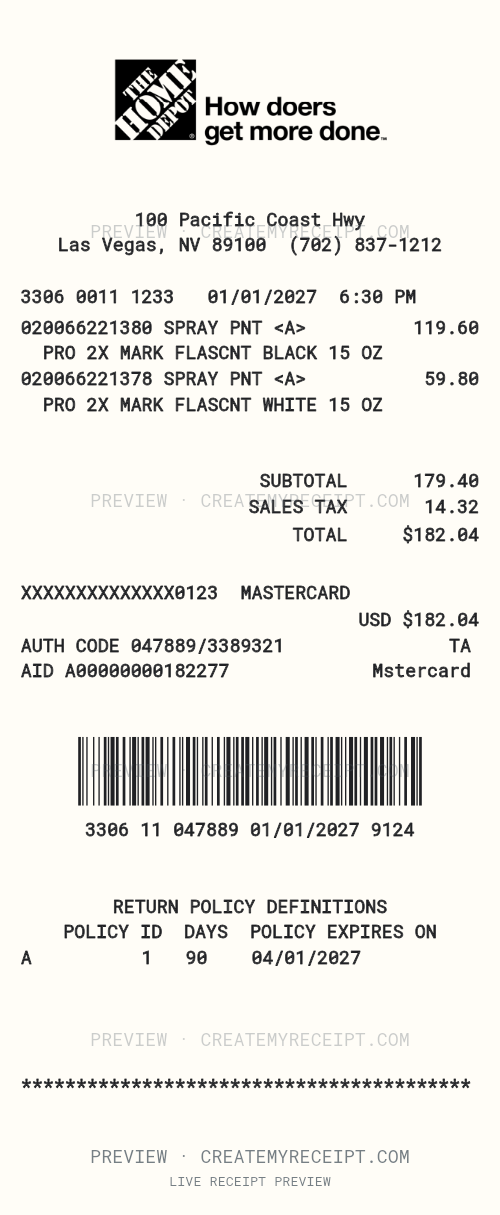
A project purchase can include many units of the same item. Keep the description, product code, quantity and unit price together so you can check each purchase. This Home Depot receipt maker provides an editable layout for design, education and internal organization of confirmed details.
Quantities and product codes
This example contains 20 units and 10 units of spray paint, with editable product codes and descriptions. Its amounts are example data, not current Home Depot prices.
Organize by project
Add a project note and retain the original receipt. Keep purchases and refunds as distinct events so returned materials do not disappear from the purchase history.
Lost or faded receipt
Start with Home Depot’s official receipt-recovery page or ask the store. If an original cannot be recovered, organize only confirmed details in a personal record.
Excel/XLSX records
Use CMR’s paid export workflow to bring reviewed records into a spreadsheet. Keep the source document alongside your organized record.
Official Home Depot receipt recovery — ask your location about receipts and payment details.
What this example shows
Custom printed wording can differ from saved numeric amounts. Review both before using the example as a record.
Fictional sample address · 100 Pacific Coast Hwy · Las Vegas, NV, 89100 · Example data, not current product prices.
| Item | Quantity | Amount |
|---|---|---|
| 020066221380 SPRAY PNT <A> PRO 2X MARK FLASCNT BLACK 15 OZ | 20 | $119.60 |
| 020066221378 SPRAY PNT <A> PRO 2X MARK FLASCNT WHITE 15 OZ | 10 | $59.80 |
| Subtotal | $179.40 | |
| Tax | $2.64 | |
| Total | $182.04 |
Fields you can edit
- Merchant
- Purchase date
- Line items
- Subtotal
- Discounts
- Tax
- Tip
- Total
- Payment method
- Personal note
Missing a receipt? Start with the store
Ask the location you visited whether it can recover your receipt. Have the date, approximate time and amount ready. Review discounts, charges and tip separately so nothing is counted twice.
Make the materials record your own
Use the template for business, education or personal organization. Replace the example values with confirmed details and keep the store document. CMR does not create a Home Depot-issued original or guarantee reimbursement.
Quick receipt questions
Are the sample address and purchase details real?
No. The address, date, items, amounts, codes and other visible details are fictional design examples. They do not identify a real store or purchase. If you create a personal record, enter only accurate details you can confirm from a purchase you made.
What if my receipt is lost or damaged?
Receipts are easy to misplace, and paper can become damaged or unreadable. First ask the store whether it can recover the original. If it cannot, recreating a personal record for internal organization may be useful. Use only confirmed purchase details, leave unknown amounts blank, and keep any surviving photo or payment record as a reference.
Can I edit the Home Depot receipt logo and header?
The example includes a logo image. You can replace an image you are entitled to use, change its scale and position, and move the address, phone or other text in the editor. Changing a logo or barcode does not create a transaction in Home Depot’s systems.
Can I edit the Home Depot template?
Yes. Click Use Home Depot template to start an editable copy. Adjust text, placement, size, items and amounts to suit your record, then review the preview before saving. Replace the example values with your own confirmed details.
Can I turn my record into an Excel document?
Take advantage of CMR’s Excel/XLSX export, included with paid Records Export access or an active unlimited pass. Review and save your records, then choose XLSX in the export workflow to organize materials, tax and project details in a spreadsheet. View export options and pricing.