A DoorDash PDF example from Heavenly Pancakes
This crop shows the heading and itemized purchase lines from an order-history document. The public image excludes the payment section and order link. The original PDF stays private.
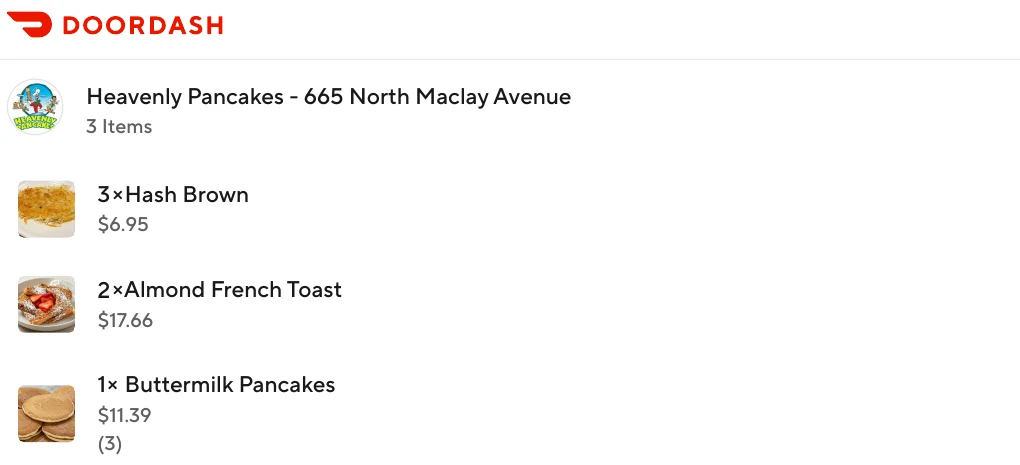
The example is from Heavenly Pancakes. Its item rows list 3 × Hash Brown, 2 × Almond French Toast and 1 × Buttermilk Pancakes. The full source document lists a total of $74.99 USD. That total is outside this crop; keep the full original when checking the purchase.
Try a sample document to learn the controls before opening a personal receipt.
Choose the tool for your task
Use the CMR editor to work with a receipt and its structured purchase data. Use Snippy to edit supported elements in a PDF you already have, such as correcting a personal note or moving an image. A PDF exported as an image may not contain editable text.
If you need a merchant-issued receipt, check order history or ask the original seller first. Editing a copy does not make it a merchant-issued original or guarantee acceptance for returns, insurance or reimbursement.
How to edit and save a separate copy
- Keep the original PDF in a separate folder. You can try Snippy's sample document first.
- Open Snippy in the new tab and choose Open PDF. The editor lists a 25 MB and 100-page limit.
- Select supported text or an image, make your change and zoom in to review it. Undo lets you return to the previous state.
- Save a copy with a different name, such as purchase-note-edited.pdf. Reopen it and check every affected page.
Check Snippy PDF pricing for current export options. Its access and export options are separate from CMR; a CMR purchase does not automatically include a Snippy pass.
What can change, and what needs another approach?
The public editor supports editing individual text runs and compatible images, inserting elements and moving selections. It does not provide word-processor paragraph reflow; substituted fonts may change the appearance.
A receipt photograph or scanned PDF contains pixels, not necessarily editable letters. We do not promise OCR or editable scan reconstruction through this link. Some complex objects are view-only; encrypted, signed and scripted PDFs are rejected. Deleting an element or cropping an image is not secure redaction.
Example: a personal note without changing the amount
You might add “Workshop supplies purchase” to a copy for your personal files. Keep the original receipt alongside that copy. The note does not change the merchant's charge, actual purchase date or structured amounts saved in CMR.
Keep your files private
This page has no document-upload form and does not send receipts to Snippy. You choose the file after opening the editor. Snippy's public editor describes document processing as browser-local. Review its supported-content and privacy information in the editor before working with sensitive information.
Do not share public links to your personal receipts. Keep the original and edited copy in private storage, and review names, addresses and payment details before sharing any document.
PDF edits do not update CSV or Excel records
Editing a PDF in Snippy does not synchronize CMR data. To sort purchases by date, merchant or item, use confirmed structured amounts in CMR and review each record before exporting CSV or Excel/XLSX with applicable paid access. Preserve source documents so you can check the amounts. Changing printed text does not recalculate totals.
See CMR help or our email receipt recovery guide before creating a record when an original is missing.